

Switching from Jekyll to Astro
Help UKRAINE
 ! Your action matters! Donate
to support Ukrainian Army! Donate to charity funds!
Organize/join street protests in your city to support Ukraine and condemn Russian aggression!
Expose and report Russian disinformation! #StandWithUkraine
! Your action matters! Donate
to support Ukrainian Army! Donate to charity funds!
Organize/join street protests in your city to support Ukraine and condemn Russian aggression!
Expose and report Russian disinformation! #StandWithUkraine Why I Started to Look Around
My blog has been running on Jekyll and GitHub Pages since 2019. When I first started writing, I didn’t just want a place to share ideas; I wanted a playground where I could experiment.
Back in 2019, Dynamics Portals (way before they became Power Pages) were gradually becoming my main focus. I decided to go with Jekyll as I wanted a blog-focused ecosystem that ran on Liquid, since I wanted to sharpen my skills with it. The main idea was that building my personal website from scratch would help me to upgrade my web development knowledge.
However, now things are different. Power Pages is evolving as a platform, allowing for hosting SPA and being a much more development-focused environment. Meanwhile, Liquid isn’t part of this transformation. And to be honest, there aren’t many things that I haven’t tried with Liquid for the last 7 years.
While Jekyll remains a fantastic, reliable choice for static sites, I realized that to keep improving my craft, it was time to try something new.
Why Astro?
I first found Astro two years ago, when I was creating a documentation website for my Lookup To Select project. Although I could have built it with Jekyll, I wanted to try something new.
After some searching and comparison, Astro was looking like an ideal candidate:
- support for MD and MDX out of the box,
- static output, so I can still use it with GitHub Pages,
- a wide variety of existing templates,
- framework flexibility, allowing me to use any frontend library or stay HTML-first,
- native support for TypeScript and modern JavaScript features,
- a growing community of passionate developers.
Overall, Astro felt like the perfect upgrade, offering a modern development experience while still allowing me to maintain the static site benefits I loved about Jekyll.
Creating a new website felt great, and even back then, I was thinking of moving from Jekyll to Astro. However, there was no “one-click” solution - my existing posts contained a lot of custom liquid code that would require significant refactoring. I tried to use AI for the job - it seemed like an ideal approach; however, technology wasn’t there yet, and the initial migration attempt failed. So I decided to postpone the idea.
Now, with Astro just releasing version 6 and Power Pages supporting Astro out of the box, I decided that the time is right and I should try again.
Migration
To move to Astro, I needed to:
- rebuilt all the liquid templates and custom components as Astro components,
- migrate all of my posts,
- maintain consistent styling and branding,
- preserve all existing URLs and RSS feeds,
- ensure that the search and subscribe functionality still works.
I decided to go with Bun as the package manager. I know that it is technically not 100% supported, but I was using Bun a lot recently and really like how snappy and all-in-one it is.
From Liquid to .astro Components
The primary task was to replace my liquid templates with pure .astro components. In the future, I might add some React or other frameworks, but for the start, pure HTML inside Astro components felt like the best option.
While Jekyll uses a “top-down” approach where a layout wraps around content, Astro treats everything as a component - even the pages themselves.
Understanding Astro’s Routing & Page Handling
If you’re coming from Jekyll, the biggest mental shift is how Astro handles the pages/ directory.
-
File-Based Routing: In Jekyll, your structure is often dictated by
_postsandpermalinksin frontmatter. In Astro, any file insidesrc/pages/automatically becomes a route. -
The .astro File Structure: Unlike Liquid, which intersperses logic and HTML, an Astro component uses a “Code Fence” (the --- block) to handle all your logic at build time.
For my migration, I utilized Dynamic Routes to handle my legacy post structure. Instead of having hundreds of individual files in my pages folder, I used a single [...slug].astro file that fetches content from my collections and generates the pages dynamically at build time.
Managing Content with Collections
In Jekyll, your posts are just files in a directory. There’s no built-in way to enforce that every post has a title or a date, and if you make a typo in the frontmatter, the build might just fail silently. Astro’s Content Collections API solves this by treating your Markdown files like a database with a schema.
By defining a schema using Zod in content.config.ts, I was able to:
-
Enforce Data Integrity: I made fields like title and date required. Beyond just checking for missing fields, Astro validates the provided data types, for example: ensuring that dates are actual Date objects and tags are arrays of strings. If a legacy post had a malformed date or an incorrect data type, Astro caught it at build time before it could break the site.
-
Enable Type Safety: My IDE now provides autocomplete for post properties, so I don’t have to remember if a field was named thumbnail or image.
My post collection schema looks like this (note the use of .optional() to define optional fields and types like z.coerce.date() to ensure that date strings are properly parsed into Date objects):
const posts = defineCollection({
  loader: glob({ pattern: '**/*.{md,mdx}', base: './src/content/posts' }),
  schema: z.object({
    layout: z.string().optional(),
    title: z.string(),
    date: z.coerce.date(),
    description: z.string().optional().default(''),
    excerpt: z.string().optional().default(''),
    shortDescription: z.string().optional().default(''),
    img: z.string().optional().default(''),
    image: z.string().optional().default(''),
    tags: z.array(z.string()).optional().default([]),
  }),
});
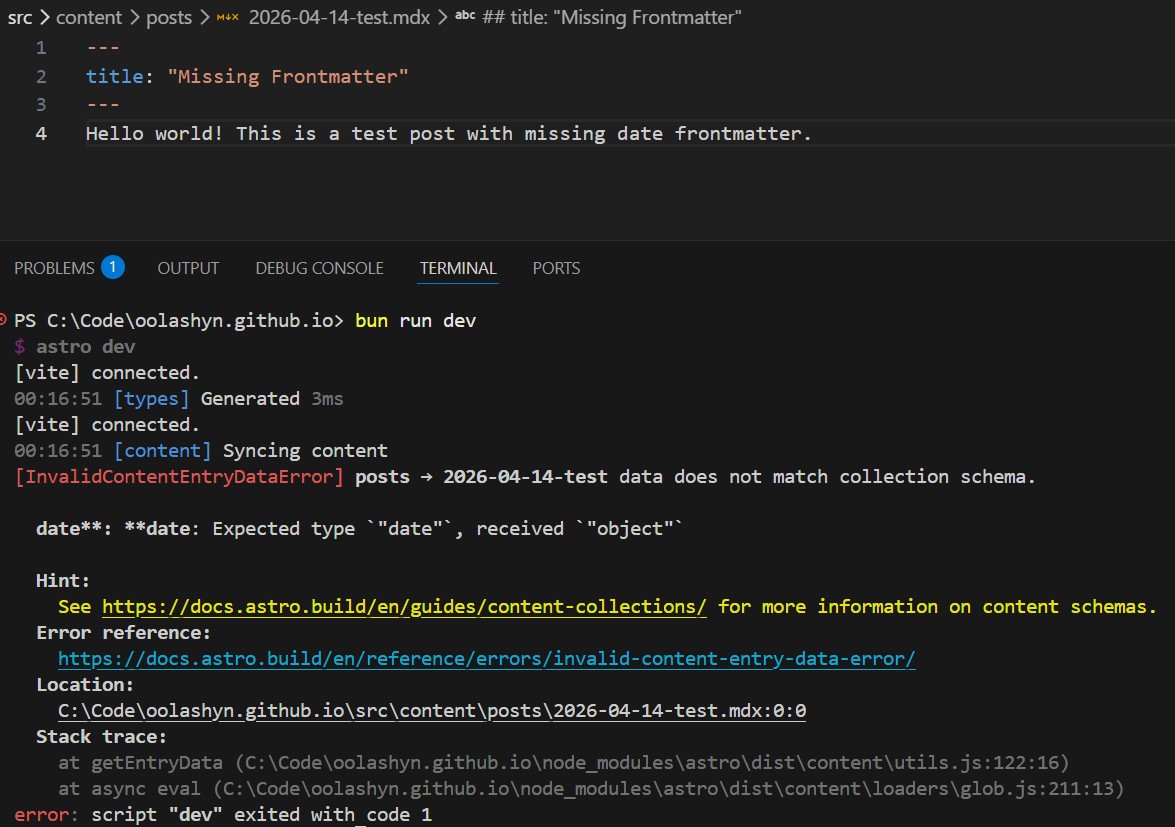
Below is an example of a frontmatter error that Astro would catch during the build process, which would have been much harder to debug in Jekyll.
Project Structure Mapping
To make the transition smoother, I used the GitHub Copilot CLI with Opus 4.6 to create a migration plan, then used Sonnet 4.6 to execute it.
Here is how my Jekyll structure maps over to Astro:
_layouts→src/layouts(directly mapped, with some adjustments to fit Astro’s component model)_includes/→src/components/(with additional customization specific components, like Video and UpdateBlock living inside the mdx folder)_data→src/data(with not just a list of projects, but an additional feeds configuration for RSS, more about it later)assets→public/assets(structure updated to match the typical Astro structure)_pages→src/pages_posts→src/content/posts
AI performed significantly better than it did two years ago, aligning the projects with much higher accuracy.
Content Migration
Honestly, this part was scaring me the most, as there would be a lot of manual work with different liquid-specific tags, but AI was able to resolve it pretty quickly (by writing some temporary Python scripts for replacement and update logic).
One specific challenge was URL preservation. Jekyll uses a _posts/YYYY-MM-DD-title.md naming convention but omits the date in the final URL.
Since Astro uses file paths for slugs by default, I updated the getStaticPaths function inside [...slug].astro component to strip the date prefix, ensuring my legacy links didn’t break.
export const getStaticPaths: GetStaticPaths = async () => {
  const posts = await getCollection('posts');
  return posts.map((post) => ({
    params: { slug: post.id.replace(/\.mdx?$/, '').replace(/^\d{4}-\d{2}-\d{2}-/, '') },
    props: { post },
  }));
};
Other key adjustments included:
- Frontmatter: Updated the schema in content.config.ts for strict type safety.
- Liquid Tags: Replaced
{% highlight %}with fenced code blocks and{% include %}with MDX component imports. All .md files were renamed to .mdx to support these components. All of these changes were done via AI.
Styling and RSS
I refactored my SCSS to follow a “one partial per component” structure, switching from the older @import syntax to the modern @use rule.
For RSS, Astro’s default package produces RSS 2.0, but I wanted Atom format. I used the following article as a reference and built a custom RSS generation pipeline inside feeds.ts using feed and unify packages.
I also took the opportunity to refresh the site’s look and feel a bit. This included a new hero post layout to make the latest updates pop, plus a much simpler header. I purposely kept the same general feel for this first pass, but I plan to experiment with it more in the future.
New Features
The migration allowed me to implement several upgrades:
- Pagefind Search: I replaced my jQuery-based search with Pagefind. It runs post-build to generate a static index, resulting in blazing-fast, low-bandwidth searches.
- View Transitions: This gives the site an SPA-like feel with smooth animations between pages. Currently, it keeps the header persistent during navigation, and I plan to experiment with more dynamic transitions soon.
- Font Optimization: I’m using Astro’s new Font API to handle web font optimization automatically.
View Transition demo is available below, and you can also check it out live on the site by clicking around the posts (notice that the header stays persistent while the content transitions in and out).
Verdict
I’m thrilled with this upgrade. The site feels modern, fast, and most importantly, it is once again a playground for me to experiment. AI helped me a lot this time around, making the daunting task of refactoring years of Liquid code manageable.
Credits
Cover image by NASA-Imagery from Pixabay