
Power Pages Backend Trifecta
Help UKRAINE
 ! Your action matters! Donate
to support Ukrainian Army! Donate to charity funds!
Organize/join street protests in your city to support Ukraine and condemn Russian aggression!
Expose and report Russian disinformation! #StandWithUkraine
! Your action matters! Donate
to support Ukrainian Army! Donate to charity funds!
Organize/join street protests in your city to support Ukraine and condemn Russian aggression!
Expose and report Russian disinformation! #StandWithUkraine For years, if you needed to do anything beyond basic CRUD in Power Pages, like calling a private API or running a secure calculation, you had to build a Companion App (an external service, usually an Azure Function or something similar, that would serve as a custom backend).
A couple of years ago, a new option emerged - Cloud Flows with a native Power Pages trigger. While a massive step forward, it wasn’t always the right fit for high-performance, synchronous tasks.
Now, with the full GA of Server Logic and the recent addition of agentic skills to automate its creation, the question arises: where should your Power Pages backend live?
Let’s start by understanding what each option brings to the table.
Companion App
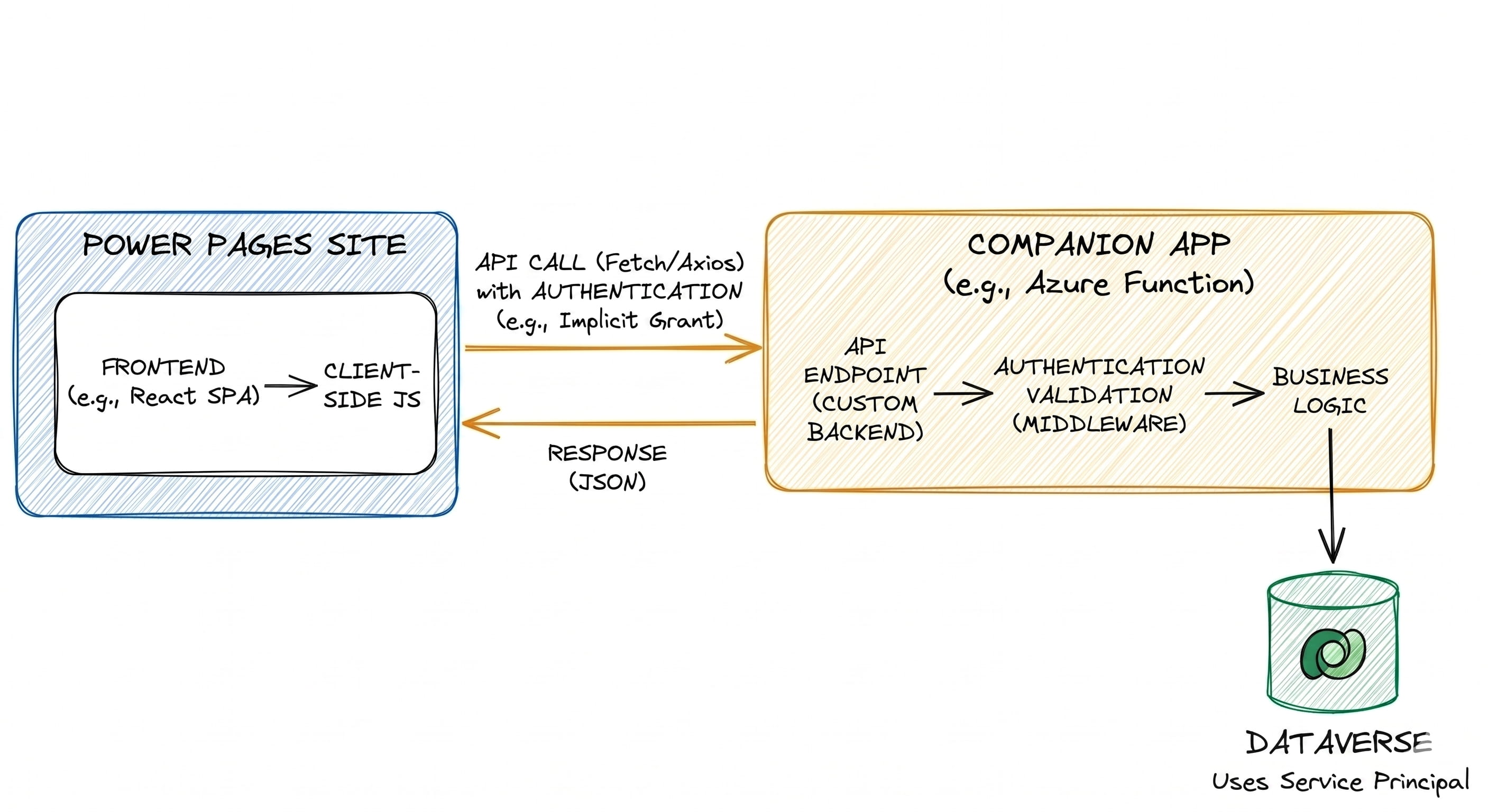
The Companion App approach emerged almost immediately with the introduction of Dynamics Portals (yep, it’s that old). It refers to any external service built to act as a dedicated backend for your site. Usually built with Azure Functions or Azure Web Apps to simplify the Dataverse connection, this approach was the only way to handle complex scenarios for a decade.
However, it suffers from two primary issues:
- Security: You had to build custom middleware to handle requests. While the OAuth 2.0 implicit grant flow became a de facto default, it required significant “handshake” code on both the client and the server (even with Microsoft providing code samples to simplify it).
- Maintainability: Your code lives in a completely separate ecosystem. You need separate Git repositories and deployment pipelines, which can lead to a “split-brain” architecture where the frontend and backend can easily fall out of sync.
Cloud Flows
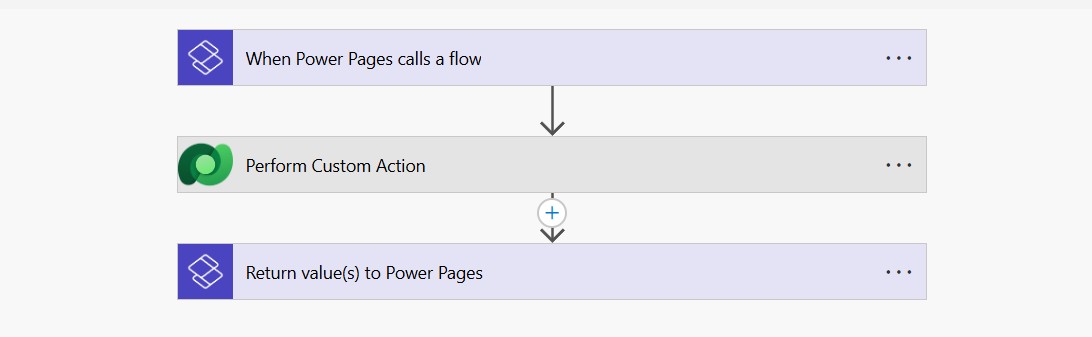
The introduction of native Power Pages support in Power Automate Cloud Flows, with dedicated trigger and response actions, was a huge win several years ago. It immediately made the Power Pages sites much more powerful by allowing the usage of 1000 built-in connectors, without the need to manage complex authentication or exposing any secrets. This makes it ideal for sending messages in Teams or emails via Outlook, or performing any action with the existing connector for external systems.
A cherry on top was native support for the Web Roles, which ensured that users had the correct role before calling the flow. However, Cloud Flow doesn’t run in the user’s context, meaning it doesn’t apply Table Permissions in any capacity. It also doesn’t know which Contact triggered the execution, unless you pass the id parameter explicitly and then perform additional validations inside the flow.
Unfortunately, despite all the benefits, Cloud Flow were not ideal for synchronous, high-performance operations.
Server Logic
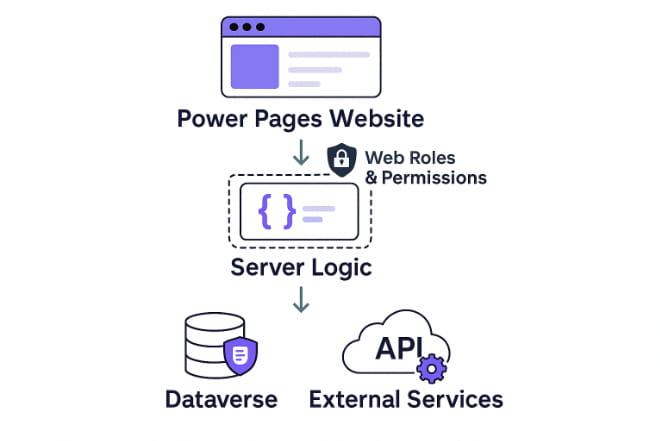
Server Logic is the latest addition to the Power Pages and, in my opinion, one of the most important. Although long overdue, it finally gives developers a “native” backend to work with.
It allows you to write JavaScript (ECMAScript 2023 compliant) that runs directly on the Power Pages server. However, it is important to understand the boundaries: this is a sandboxed server environment. You cannot use browser-specific APIs (like window or document), and standard client-side networking tools like fetch or XMLHttpRequest are replaced by the native Connector.HttpClient object. Additionally, for security reasons, you cannot currently import external npm packages or libraries.
Unlike Cloud Flows, which are asynchronous and better suited for “workflow” tasks, Server Logic is designed for synchronous, high-performance operations. It is ideal for:
- Calling a service like Stripe or OpenAI without exposing your API keys to the browser.
- Running multi-table logic before allowing a Dataverse write.
- Performing secure server-side filtering or returning aggregated data structures.
Security Context
By design, Server Logic runs in the context of the current user, with all table permissions applied. In 90% of scenarios, this is exactly what we need - it ensures that your backend logic respects the existing security hierarchy. You don’t have to manually re-validate if a user “should” see a record; the platform does it for you.
However, this “User Context” can be a double-edged sword. If you need to perform a “System Context” operation, for example, validating a promo code against a “Marketing Campaigns” table that is hidden from regular users, Server Logic will return nothing because it respects the user’s lack of permissions.
Fingers crossed that Microsoft will update this in the future and allow us to perform System-level queries natively, empowering an already capable option.
Agentic development workflow
The recent release of the Power Pages Agentic Skills for Claude Code and GitHub Copilot has turned the complex task of backend configuration and creation into a more streamlined and straightforward process.
Compatibility Note: These agentic skills are specifically designed for the newest SPA-based website creation and management workflows. They will not function properly with traditional Power Pages sites.
Here is how these skills reshape the build process:
- /add-server-logic: generates a Server Logic endpoint, including not just the code, but also the endpoint configuration, security role assignment, etc.
- /add-cloud-flow: acts as the bridge to your automated workflows. It identifies an existing Power Pages-enabled Cloud Flow and generates the necessary code to invoke it and process its response.
- IMPORTANT This skill does not create a new Cloud Flow. You still need to design your business logic within the Power Automate designer first; the agent just handles connecting it to your SPA.
- /integrate-backend: this is the most interesting one. Acting as a Power Pages Architect, the agent analyzes your project’s requirements and determines the optimal approach for each feature - whether that’s a simple Web API call, a synchronous Server Logic endpoint, or an asynchronous Cloud Flow. It then orchestrates the entire build sequence across your project files.
How to choose
My advice is to follow a “Native-First” approach: only use external services when the platform’s sandbox limits your requirements.
Start with Server Logic for almost everything. If your task involves securing an API key, performing a synchronous calculation, or validating data before it hits Dataverse, Server Logic is your best friend. It offers the lowest latency and tightest integration.
Switch to Cloud Flows when the ecosystem is the priority. If your requirement ends with an action in another service, like sending an approval email via Outlook, posting a notification to a Teams channel, or updating a file in SharePoint, don’t reinvent the wheel. Use the native Power Pages trigger to invoke a flow and let prebuilt connectors do the work.
Reserve the Companion App for the “heavy tasks”. If you find yourself hitting the limits of the JavaScript sandbox and task is too complex or code-depndant for Flow, this is a choice for you. Use an Azure Function or Web App if you need to:
- Use a proprietary C# library or a specific NuGet/NPM package.
- Perform high-intensity compute tasks (like image/video processing).
- Access on-premises data via VNet integration.
Remember that you don’t have to choose just one. You might use Server Logic to validate a form synchronously, a Cloud Flow to notify the team afterward, and a Companion App to generate a complex PDF report in the background; all inside the same site.
The goal isn’t to find the “perfect” tool for the whole project, but to choose the most efficient tool for the specific task at hand.
Conclusion
In my opinion, Server Logic is the new default for the Power Pages backend. It offers a great combination of capabilities to create secure and high-performance endpoints, internal implementations of which shouldn’t be exposed to the client.
This doesn’t mean that Cloud Flows or Companion Apps are obsolete. They still serve a purpose by solving specific problems and being ideal for their own scenarios.
You don’t have to choose one - just select the tool that is the best for the job.
Credits
Cover Image by Willi Heidelbach from Pixabay
Server Logic Image by Microsoft